AnkerMake M5 3D Printer Review UK 2026
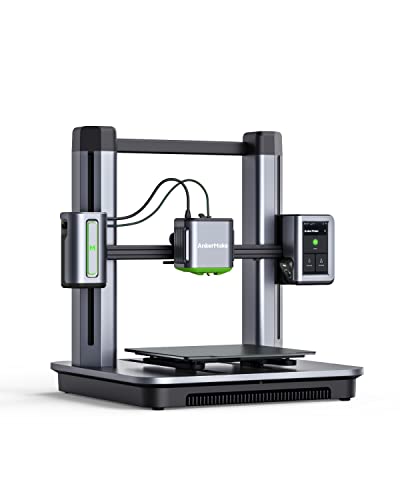
Quick verdict
Score: 8.4/10
Best for: Makers wanting versatile printing of functional parts and larger models
Not for: Those chasing the finest miniature detail - a resin printer suits that better
Bottom line: A FDM 3d printer (235 x 235 x 250 mm, 500 mm/s), a versatile choice for everyday printing.
The AnkerMake V81112C1's V81112C1 (M5) is a mid-to-large FDM printer built around a 235 x 235 x 250 mm platform and a claimed print speed of up to 500 mm/s, with a focus on speed and repeatable first layers. This 3D printer review uk quick verdict is mixed but clear: it fits users who want larger print areas and consistent initial adhesion, supported by PowerBoost 3.0 and 7x7 auto-levelling. Assembly is fairly quick, taking around 15 minutes, although full capability depends on The AnkerMake.
Key specifications
| Spec | Notes |
|---|---|
| Speed | Up to 500 mm/s (claimed) |
| Detail | 0.1 mm (claimed) |
| Auto-levelling | 7x7 system |
| Monitoring | Camera-based error detection |
Pros
- 235 x 235 x 250 mm build volume
- Up to 500 mm/s print speed
- Automatic bed levelling
Cons
- Slicing and first-layer setup take some learning
- Consumables (filament/resin, nozzles/FEP) add to running cost
Build Volume and Print Size
With a build volume of 235 x 235 x 250 mm, the 3D printer (M5) is built for fairly large single models and can also handle multi-part printing jobs. In practical terms, the AnkerMake (M5) 3D printer can fit many everyday prototypes, enclosures, and replacement parts without needing heavy scaling. For larger designs, the same volume allows users to split files into sections and assemble them afterward. The die-cast aluminium structure supports the Z-axis layout, although exact limitations depend on the chosen model geometry. Printing from the 3D printer app is also possible.
Print Speed and Quality
Print speed and quality on the AnkerMake V81112C1 (M5) are closely linked, since it is rated for print speeds up to 500 mm/s and is designed to keep accuracy stable at higher accelerations. The manufacturer links performance to PowerBoost 3.0 firmware, which targets smoother output and increased acceleration while preserving print quality. A claimed 0.1 mm detail capability and an ultra-direct extruder support finer results. Higher speeds should be validated for reliability, because achieved quality depends on the selected acceleration and first-layer conditions.
Filament Compatibility
Filament compatibility matters because the V81112C1 (M5) is designed to run fast, up to 500 mm/s. That level of performance only translates into good results when the filament type and setup match the printer's extrusion system. For the AnkerMake, users should rely on the manufacturer's recommended filament guidance in The 3D printer, since PowerBoost 3.0 and the ultra-direct extruder can respond differently to material behaviour. They should verify filament diameter first, then match temperatures and speed profiles in Studio (exact values: not stated). If results show stringing or weak layers, they can reduce speed and re-check settings.
Build Plate and Levelling
Accurate first layers depend on the build plate being level, and the AnkerMake (M5) is built around an auto-levelling approach with a 7x7 system. A built-in leveling sensor creates a virtual height map, then compensates during the start of prints. Begin with a quick check that the surface is clean, then start levelling, and proceed only once the map has been applied. Correction is consistent across the 235 x 235 mm area, although manual fine-tuning can still be helpful if results drift.
Software and Slicer Compatibility
To get the most consistent results from the 3D printer (M5), software and slicer setup should be handled early, since printer output depends on the right tools and settings. This 3D printer supports using The AnkerMake to enable PowerBoost 3.0, which the manufacturer says improves smoother output and acceleration. Slicers should be configured for a 0.1 mm detail target and aligned with the M5's camera-based error detection workflow. When comparing the AnkerMake V81112C1 against generic FDM profiles, compatibility can vary, and first-layer performance is the best check.
Setup and Learning Curve
Setup and learning curve are closely tied to how the V81112C1 (M5) handles first layers, error checks, and speed. The Amazon UK listing describes the printer as easy to assemble, with a process from unboxing to printing in about 15 minutes using the included tools. The printer uses 7x7 auto-leveling to generate a virtual height map, which supports more consistent first-layer results. PowerBoost 3.0 firmware is stated to target smoother output at higher acceleration. For early prints, start slower, because error detection can auto-pause and issue real-time notifications when problems occur.
Noise and Enclosure
Noise from the 3D printer (M5) will depend on how fast it is printing and how much acceleration is applied during a given job. The manufacturer lists up to 500 mm/s as its print speed and describes the firmware as improving smoother output and higher acceleration. Faster moves and acceleration changes typically raise the audible activity, while smoother firmware can reduce harsh bursts. For this 3D printer pros and cons, enclosure is mainly about where the printer is placed. No enclosure details are specified, so a draft-free spot is the most reliable approach.
Cleaning and Maintenance
Cleaning and maintenance for the AnkerMake (M5) centres on keeping the build surface clean for the first layer, monitoring extruder condition, and installing firmware and software updates linked to PowerBoost 3.0. Before each print run, the printer should be inspected, then the first layer surface wiped with a lint-free cloth after cooling. The first layer should appear consistent; if residue remains, the surface needs a further careful clean. The extruder should be checked for clogs, and filament should feed smoothly. PowerBoost 3.0 behaviour can change, so updates via The 3D printer should be installed without delay.
Who Is This 3D Printer For?
The AnkerMake (M5) 3D printer is best suited to hobbyists and makers who want an FDM printer with a 235 x 235 x 250 mm build area. It targets users looking for high-speed printing at up to 500 mm/s and for safety-conscious operation, with error detection and camera-based monitoring. It also suits people who value straightforward setup, since assembly takes about 15 minutes and it includes auto-leveling to support accurate first layers. It may be less convenient for buyers who want fully hands-off operation, since the background does not specify that level of autonomy. It is also potentially more capable than needed for very small print jobs, where the 235 x 235 x 250 mm build area may be more than required.
Where to Buy in the UK
Finding the right retailer for the 3D printer (M5) in the UK can affect how quickly the printer arrives and how straightforward it is to get started with firmware and app support. Buyers typically compare online tech stores and major marketplaces, since stock availability and delivery speed can vary. For the AnkerMake V81112C1 (M5) 3D printer, it is worth checking the listing for included assembly tools, since the model is designed for setup in about 15 minutes. After delivery, users download This 3D printer to enable PowerBoost 3.0, and test the 7x7 auto-leveling before moving to larger 235 x 235 x 250 mm prints. Where to Buy Amazon UK, John Lewis, Currys, AO, Argos, Plus Box, 3D Printz, iGo3D, Technology Will Save Us
Frequently Asked Questions
Is the AnkerMake good for beginners and home use?
Features like automatic bed levelling make the 3D printer approachable for newcomers. Expect a short learning curve around slicing and first-layer setup, after which home printing is straightforward.
Is the AnkerMake an FDM or resin printer, and what is the difference?
The 3D printer is an FDM (filament) printer - more versatile and lower-maintenance than resin, and better for functional parts and larger models. Resin only wins on ultra-fine detail.
Is this 3D printer worth it?
If you enjoy making functional parts, prototypes and larger models, a printer like the AnkerMake V81112C1 pays off over time. Factor in filament and the occasional nozzle as the main ongoing cost, and check the current Amazon UK price.
How much does it cost to run the 3D printer?
Running costs are mainly consumables: filament, at roughly a few pounds per standard roll, plus occasional nozzles. Electricity use is modest, so budget mostly for filament.
What is the AnkerMake's build volume?
The 3D printer has a build volume of 235 x 235 x 250 mm, which sets the largest single print it can produce.
How fast does this 3D printer print?
The AnkerMake lists a maximum print speed of 500 mm/s; real-world speeds are usually lower to preserve quality.
What software does the 3D printer use?
The AnkerMake V81112C1 works with common slicers such as Cura, PrusaSlicer or the maker's own slicer, which turn 3D models into printable files.