Elegoo Centauri Carbon 3D Printer Review UK 2026
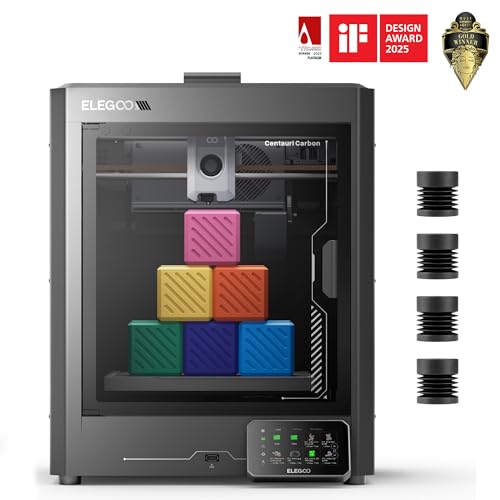
Quick verdict
Score: 7.9/10
Best for: Makers wanting versatile printing of functional parts and larger models
Not for: Those chasing the finest miniature detail - a resin printer suits that better
Bottom line: A FDM 3d printer (256 x 256 x 256 mm, 500 mm/s), a versatile choice for everyday printing.
So, how well does the Elegoo Centauri Carbon perform for UK makers in 2026? The verdict is straightforward. It arrives fully assembled and pre-calibrated, with auto bed levelling to support easy first layers. The 256 x 256 x 256 mm build volume and CoreXY approach suit larger functional prints, while speeds up to 500 mm/s and high acceleration target fast turnaround. For PLA, the provided PLA-specific surface helps adhesion at lower bed temperatures, though advanced filament performance, chamber design and enclosure cooling must be applied correctly for consistent results.
Key specifications
| Category | Specification Notes |
|---|---|
| Printer type | FDM Not specified for others |
| Build volume | 256 x 256 x 256 mm Details follow next |
| Speed/Accel | 500 mm/s, 20,000 mm/s² Manufacturer-stated |
| Nozzle | 320°C Brass-hardened steel |
| Control/Bed | Touchscreen, heated bed Auto levelling |
Pros
- 256 x 256 x 256 mm build volume
- Up to 500 mm/s print speed
- Automatic bed levelling
- Heated bed for better adhesion
- Supports PLA
Cons
- Slicing and first-layer setup take some learning
- Consumables (filament/resin, nozzles/FEP) add to running cost
Build Volume and Print Size
This 3D printer offers a square build volume of 256 x 256 x 256 mm, making it suitable for medium-sized mechanical parts and larger display models. The cubic envelope supports taller objects provided they fit within the 256 mm height limit and the planned part footprint. The printer arrives fully assembled and pre-calibrated, enabling faster setup for larger prints. Though, layout planning is still needed for multi-part projects.
Print Speed and Quality
With an advertised print speed of up to 500 mm/s and acceleration of 20000 mm/s², the Elegoo is positioned for fast builds, particularly for larger parts where time matters. Speed is supported by a rigid die-cast frame, auto vibration compensation, and pressure advance, which work together to reduce streaks and uneven extrusion. For print quality, the printer includes an enclosed chamber with improved cooling and a heated bed, so PLA tends to adhere well and warp less. Consistent high-speed output still depends on model geometry and cooling conditions.
Filament Compatibility
Filament compatibility on the 3D printer is designed around PLA and then extends to more demanding materials. The manufacturer states it is tailored for "advanced filaments" and specifically highlights carbon fibre reinforced filament. It ships ready to print with PLA, and the enclosed chamber with improved cooling is intended to support use beyond basic plastics. For the Elegoo, the nozzle is described as a 320°C brass-hardened steel nozzle, which is positioned as helpful when moving to carbon fibre reinforced filament. Users should expect tougher parts, while PLA still requires the usual care for adhesion and heat control.
Build Plate and Levelling
Build plate performance and levelling set the start quality, particularly when printing PLA on a textured surface and later moving to more demanding filaments. The dual-sided build plate includes a PLA-specific surface designed to improve adhesion and limit warping. The printer arrives fully assembled and pre-calibrated, and it uses auto bed levelling, so the first-layer setup is usually quick. For best results, a simple routine is to power on, start the auto level, then run a small test square. If corners lift, the heated bed temperature and first-layer flow may need small adjustments.
Software and Slicer Compatibility
Software and slicer compatibility for the 3D printer is mainly about how easily it can take common G-code files and how well those settings suit its enclosed, high-speed FDM setup. Owners can slice STL files into G-code for this enclosed CoreXY printer with a 256 x 256 x 256 mm build volume, then print the resulting G-code from the onboard interface. For users finding it via the Amazon UK listing, the key check is whether slicer profiles support PLA at typical chamber temperatures.
Setup and Learning Curve
Although the Elegoo Centauri Carbon is designed to be straightforward, the setup still takes an organised first session, particularly for first-time users. The Elegoo review notes that the unit arrives assembled and pre-calibrated, so the early steps focus on placement, filament loading, and confirming auto bed levelling operates as expected. The typical first workflow starts with an auto bed level run, followed by loading PLA and checking that the touchscreen controls correspond to the selected profile.
Noise and Enclosure
Because the 3D printer uses an enclosed chamber, it can reduce drafts around the print area, which helps with consistency during longer sessions, particularly when printing PLA. The integrated enclosure also dampens some sound reaching the room, and the rigid die-cast frame helps limit vibration for steadier motion at high speeds. The main trade-off is heat build-up, so normal ventilation is important where the printer is positioned. The enclosure supports consistency, the camera adds a monitoring benefit, and the enclosed design can increase ambient warmth.
Cleaning and Maintenance
Cleaning and maintenance on the Elegoo are mainly about keeping the enclosed printing area, nozzle, and build surface in good condition, so prints stay consistent over time. In this review, routine care starts after each print, when residue on the dual-sided plate and around the chamber is removed gently with a soft brush. The nozzle should be wiped while warm, then any clogs cleared by running short test moves at normal settings. The PLA-specific surface benefits from light cleaning only, because abrasive scraping can reduce adhesion, especially when switching filaments. Finally, the enclosed airflow area should be checked for dust buildup.
Who Is This 3D Printer For?
Who is the 3D printer really suited for in the UK, and what kinds of prints does it handle best? It suits beginners and experienced makers who want a 256 x 256 x 256 mm FDM build, because it arrives fully assembled and pre-calibrated with auto bed levelling. It also fits people focused on speed, since its CoreXY design is intended for up to 500 mm/s for large, detailed parts. For buyers weighing whether this 3D printer is worth it, it is best matched to PLA printing, with carbon fibre reinforced filament handled via its enclosed chamber for stronger, lightweight results.
Where to Buy in the UK
For buyers in the UK, the Elegoo should be sourced from retailers that clearly state the printer is fully assembled and pre-calibrated. The model description includes "ready to go right away", with auto bed leveling and a touchscreen interface. When comparing listings for the Elegoo Centauri Carbon best price uk, look for references to the 256 x 256 x 256 mm build volume and CoreXY motion. Filament support should be checked as the stated material is PLA. Some shops may bundle PLA.
Frequently Asked Questions
Is the Elegoo Centauri Carbon printer good for beginners and home use?
Features like automatic bed levelling make the Elegoo printer approachable for newcomers. Expect a short learning curve around slicing and first-layer setup, after which home printing is straightforward.
Is the Elegoo Centauri Carbon printer an FDM or resin printer, and what is the difference?
The Elegoo printer is an FDM (filament) printer - more versatile and lower-maintenance than resin, and better for functional parts and larger models. Resin only wins on ultra-fine detail.
Is the Elegoo Centauri Carbon printer worth it?
If you enjoy making functional parts, prototypes and larger models, a printer like the Elegoo printer pays off over time. Factor in filament and the occasional nozzle as the main ongoing cost, and check the current Amazon UK price.
How much does it cost to run the Elegoo Centauri Carbon printer?
Running costs are mainly consumables: filament, at roughly a few pounds per standard roll, plus occasional nozzles. Electricity use is modest, so budget mostly for filament.
What is the Elegoo Centauri Carbon printer's build volume?
The Elegoo printer has a build volume of 256 x 256 x 256 mm, which sets the largest single print it can produce.
How fast does the Elegoo Centauri Carbon printer print?
The Elegoo printer lists a maximum print speed of 500 mm/s; real-world speeds are usually lower to preserve quality.
What software does the Elegoo Centauri Carbon printer use?
The Elegoo printer works with common slicers such as Cura, PrusaSlicer or the maker's own slicer, which turn 3D models into printable files.