Bambu Lab P1S Combo + AMS 3D Printer vs Creality K2 Pro Combo 3D Printer
We compare the Bambu Lab P1S Combo + AMS 3D Printer and the Creality K2 Pro Combo 3D Printer across every dimension that matters - our scores, the key specs, and how each performs on the things you will actually notice day to day.

At a glance
| Bambu Lab P1S Combo + AMS 3D Printer | Creality K2 Pro Combo 3D Printer | |
|---|---|---|
| Our score | 8.1/10 | 7.4/10 |
| Best for | Makers wanting versatile printing of functional parts and larger models | Makers wanting versatile printing of functional parts and larger models |
| Not ideal for | Those chasing the finest miniature detail - a resin printer suits that better | Those chasing the finest miniature detail - a resin printer suits that better |
| Brand | Bambu Lab | Creality |
Build Volume and Print Size
Bambu Lab P1S Combo + AMS 3D Printer
With its stated size and mass, this 3D printer is positioned as a complete, enclosed FDM system whose main output area depends on the print dimensions it can physically support. For buyers the outer product dimensions are listed as 38.9 x 45.8 x 38.9 cm, and the item mass is 21.6 kg. The manufacturer text does not specify the actual build volume, usable height, or maximum part footprint, which limits what can be planned for large, multi-part prints.
Creality K2 Pro Combo 3D Printer
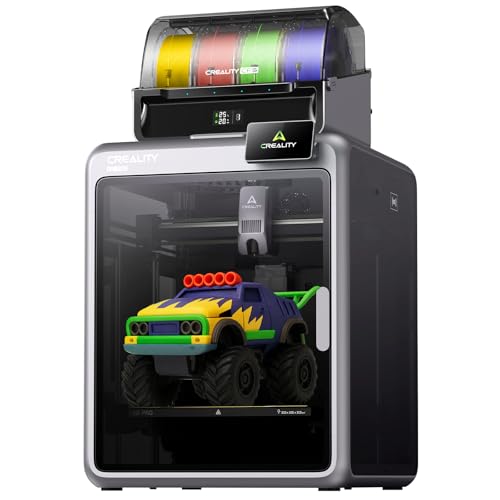
This 3D printer has a 300 x 300 x 300 mm build volume, so it supports printing parts up to that size in length, width, and height without splitting the model. For anyone evaluating the Creality in the UK, this is particularly relevant for larger prototypes and multi-part batches that need to be completed in a single run. Practically, the build size is bounded by the 300 mm limits in all three dimensions, and very tall models can still need orientation changes to fit within the available height. For oversized items beyond those limits, the model would need splitting, which is consistent with most FDM approaches.
Print Speed and Quality
Bambu Lab P1S Combo + AMS 3D Printer
Print speed and quality on the Bambu Lab are tied to its published performance features and the printer's enclosed design. Performance is described as printing up to 16 colours with MAS by stacking four units. The manufacturer also claims acceleration up to 20mm/s², plus pressure advance and vibration compensation, designed to keep fine detail stable during faster movements. Setup includes step-by-step actions starting from pressing print, followed by automatic bed levelling and vibration compensation, which can reduce variation. Actual results depend on the selected print model, the print height and the complexity of the design.
Creality K2 Pro Combo 3D Printer
With its up-to 600 mm/s print speed and up to 20,000 mm/s² acceleration, the 3D printer is designed to move quickly while maintaining smooth motion, using an FDM setup with FOC step-servo motors and linear rails. Print speed is balanced with quality controls: an AI camera on the nozzle auto-tunes flow rate in real time, supported by pressure advance tuning to help reduce under- or over-extrusion. Quality also relies on cooling and stability, since active chamber heating maintains up to 60°C to help prevent corner warping on materials like ASA.
Filament Compatibility
Bambu Lab P1S Combo + AMS 3D Printer
Filament compatibility on the 3D printer depends heavily on its fully enclosed body, because this design helps maintain temperature stability during printing. In the Bambu Lab (P1S + AMS), the enclosed construction supports more consistent results with advanced filaments, compared with open-frame designs. Higher-temperature filaments are more likely to print consistently. For multi-colour work, the AMS system supports switching materials.
Creality K2 Pro Combo 3D Printer
Filament compatibility matters on the Creality because it is built to handle more than basic PLA while still requiring correct material settings. The printer supports PLA, ABS, ASA, PPA-CF, PET-CF, and more, enabling softer or tougher part characteristics depending on the chosen filament. It also works with the CFS Smart Filament System, which uses auto filament identification and intelligent feeding. For best results, temperature and flow must match the selected filament, otherwise under-extrusion and poor layer adhesion may occur. Carbon-fibre filament types can print faster but may be more abrasive.
Build Plate and Levelling
Bambu Lab P1S Combo + AMS 3D Printer
Because the P1S Combo is designed as a fully enclosed printer, the build plate and levelling process helps keep conditions stable while layers are formed. The printer is described as having a capability to print up to 16 colours, supported by automatic bed levelling and vibration compensation. Before printing, the user typically selects the model and starts Print, and the system performs calibrations without manual steps. If the results look uneven, the build plate should be cleaned and the job restarted, since long outages can shift surface contact.
Creality K2 Pro Combo 3D Printer
Build plate setup on the 3D printer affects first-layer adhesion and links directly to how reliably the selected filament settings translate into a stable print. A key advantage versus older beds is worry-free auto-levelling, which probes only the model's print areas to reduce setup time. Start by cleaning the plate surface, then run auto-levelling, then verify the first layer is even, with no gaps and no excessive squish. If the chamber is heated to 60°C for ASA, warping risk is lower, but tuning is still required.
Software and Slicer Compatibility
Bambu Lab P1S Combo + AMS 3D Printer
How well does the 3D printer (P1S + AMS) handle everyday software use and file compatibility? The 3d printer relies on the bundled "sophisticated hardware and software, " and it is described as print-ready, so users can start printing without manual calibration steps. File compatibility is positioned as supporting an out-of-the-box workflow. Multi-colour output via the included multi-colour capability is handled through the printer's software workflow, and stacking additional units can extend colour capability. Quick Verdict The software workflow is described as print-ready for immediate use, with multi-colour printing handled through the bundled system.
Creality K2 Pro Combo 3D Printer
Software and slicer compatibility determines how reliably the Creality K2 Pro Combo converts an STL or CAD model into toolpaths, particularly when switching materials such as PLA and ASA. The Amazon listing indicates broad filament support, including PLA, ABS, ASA, and carbon-fibre blends, so slicer profiles need to reflect those material behaviours. The printer includes an auto-tuning capability using its cameras for nozzle flow, but slicing still sets temperatures, speeds, and retraction. G-code should be checked for filament-change sequences and command formatting, as mismatched slicer settings can lead to weak layer bonding.
Setup and Learning Curve
Bambu Lab P1S Combo + AMS 3D Printer
Once the Bambu Lab P1S Combo (P1S plus AMS) is unboxed, the setup process is positioned as straightforward, with the printer described as "complete performance ready to use" and "just click[s] print, " with calibrations handled by the machine. It also supports high temperature printing and includes an enclosed body, which can be relevant when experimenting with advanced filaments. For most users, the learning curve is described as low because automatic bed leveling and vibration compensation reduce tuning. However, whether the Bambu Lab plus AMS 3D printer is any good depends on workflow, since multi-colour use via the AMS requires additional loading steps and careful profile checks.
Creality K2 Pro Combo 3D Printer
Setting up the Creality typically involves a short but deliberate learning period, because the printer integrates automation features alongside high-speed motion, so early calibration is important. The bed is auto-levelled by probing only model-print areas, followed by a first-layer test to check adhesion. Filament loading then comes next, with the printer's CFS Smart Filament System handling identification and feeding, alongside storage routines designed to keep filament dry. The printer is rated for speeds up to 600 mm/s and accelerations up to 20,000 mm/s², so tuning flow via the nozzle AI camera is important. The 3D printer's pros and cons include faster setup, but it is less tolerant of skipped tests.
Noise and Enclosure
Bambu Lab P1S Combo + AMS 3D Printer
Noise and enclosure are central to the P1S Combo's day-to-day use, particularly during longer print runs, where the enclosed plastic body can influence what is noticeable in the room. With this enclosed design, sound containment tends to be the main point of difference versus open-frame comparisons, rather than print speed itself. Motion and filament activity are still audible, but the shell helps reduce direct air movement. The enclosure also supports higher temperature printing for advanced filaments. Strength comes from calmer placement, while the weakness is reduced visual access.
Creality K2 Pro Combo 3D Printer
Because the Creality is built for high-speed FDM printing, it can be noticeable in typical home or workshop spaces, particularly during fast moves rated up to 600 mm/s and rapid acceleration rated up to 20,000 mm/s². For day-to-day use, placing the printer on a rigid surface and keeping the enclosure doors closed can reduce perceived vibration. If the printer runs unattended, chamber heating up to 60°C can help stability, but ventilation plans remain necessary.
Cleaning and Maintenance
Bambu Lab P1S Combo + AMS 3D Printer
After looking at how the enclosed body affects what can be heard during long prints, attention shifts to upkeep. Cleaning routines influence how consistently the 3D printer can perform, and simple, repeatable steps help. First, wipe the exterior and keep the enclosed body dry. Next, check the build plate for stuck residue and gently clean it between jobs. Finally, clear filament dust from vents and around the print path, since buildup can cause feed issues. These practices support the Bambu Lab pros and cons, but they add routine time.
Creality K2 Pro Combo 3D Printer
Regular cleaning helps keep the 3D printer printing reliably, particularly because it is aimed at high-speed FDM work where residue can affect layer quality. After each multi-material run, the printer should be checked and wiped to remove dust and filament dust. Let the nozzle cool first, then brush the nozzle exterior and clean the hotend opening using dry tools only. Inspect the build plate, remove any stuck bits, and re-check auto levelling results before starting a new batch. If a clog occurs, use the quick-swap hotend for fast service, and clear the waste chute if a blockage is suspected.
Who Is This 3D Printer For?
Bambu Lab P1S Combo + AMS 3D Printer
Who the 3D printer is best suited for, and who may find it harder to justify, comes down to how often multi-material printing is needed. It is mainly for people who want a ready-to-print, fully enclosed FDM printer that supports advanced filaments, and who value multi-colour work through AMS. It suits beginners through experienced makers who prefer automation, since automatic bed levelling and vibration compensation reduce setup time. The person asking "is this 3D printer any good" is typically looking for fast, high-quality prints and quick multi-material changes, up to 16 colours. It is harder to justify for those who mostly print single-colour parts, especially when multi-colour switching is rarely required.
Creality K2 Pro Combo 3D Printer
This 3D printer is best suited to people who want fast FDM printing, a large work area, and multi-material runs, rather than only basic single-colour prints. With a 300 x 300 x 300 mm build volume and up to 600 mm/s speed, it fits makers, students, and small studios that batch-print prototypes or multiple small parts. Buyers also interested in "is the Creality any good" should note its CFS smart filament system, which supports up to 16-colour multi-material prints using PLA, ABS, and ASA (and more if supported). This approach comes with more setup than simpler single-extruder printers.
Bambu Lab P1S Combo + AMS 3D Printer: pros
- Versatile FDM printing
Cons
- Slicing and first-layer setup take some learning
- Manual bed levelling unless the listing states otherwise
- Consumables (filament/resin, nozzles/FEP) add to running cost
Creality K2 Pro Combo 3D Printer: pros
- 300 x 300 x 300 mm build volume
- Up to 600 mm/s print speed
- Automatic bed levelling
- Supports PLA, ABS, ASA
Cons
- Slicing and first-layer setup take some learning
- Consumables (filament/resin, nozzles/FEP) add to running cost
Our verdict
Our pick is the Bambu Lab P1S Combo + AMS 3D Printer (our score 8.1/10) - A FDM 3d printer, a versatile choice for everyday printing. The Creality K2 Pro Combo 3D Printer is still worth it if it is cheaper when you check, or if it better matches your specific needs.